

The formula lenders use is simpler than it looks: take your Schedule C net profit (Line 31), add back non-cash deductions like depreciation and business-use-of-home, subtract anything nonrecurring, then divide by 12 for a monthly number (or average two years and divide by 24). That adjusted figure, not your tax return’s bottom line, is what an underwriter uses to qualify you.
- Formula: Net profit + allowable add-backs − disallowed/nonrecurring items = adjusted annual income
- Fastest tools: the Fannie Mae Income Calculator and Freddie Mac’s Income Calculator both automate this
- Save this: the Findings Report or worksheet output belongs in your loan file
Pro Tip: Run your last two years of Schedule C data through the Fannie Mae Income Calculator before you apply. It takes ten minutes and tells you exactly what number an underwriter will see.
Key Takeaways
Schedule C income mortgage calculation depends on turning tax-driven net profit into a documented, add-back-adjusted cash flow figure that reflects what an underwriter can verify as stable and continuous.
| Point | Details |
|---|---|
| The core formula | Net profit + add-backs (depreciation, home office, amortization) − nonrecurring items, divided by 12 or 24. |
| Trend determines averaging | Rising or flat income gets averaged over two years; declining income often defaults to the lower recent year. |
| Documentation drives approval | Two years of returns, YTD P&L, and bank statements should reconcile before you submit. |
| Use the official tools | The Fannie Mae Income Calculator and comparable worksheets produce a lender-ready number in minutes. |
| When Schedule C falls short | 1st Nationwide Mortgage’s bank statement, DSCR, and NONI programs offer paths that don’t hinge on tax-return net profit. |
This article is general information, not a substitute for advice from a qualified financial advisor. Consult a qualified financial professional about your own circumstances before acting on anything here.
Table of Contents
- What Schedule C Income Mortgage Calculation Means to Underwriters
- Step-by-Step Calculation for Self-Employed Mortgage Qualifying
- Two-Year Average vs. Most Recent Year: Which Applies to You
- Documentation Checklist for Schedule C Income Verification
- Common Mistakes That Shrink Your Qualifying Income
- Fannie Mae Income Calculator and Other Tools Worth Using
- A Worked Example: Two Years of Schedule C Into Monthly Income
- What “Stable and Continuous” Income Really Means to Underwriters
- A Mortgage Banker’s View on Getting This Calculation Right
- How 1st Nationwide Mortgage Helps Self-Employed Borrowers Qualify
- Sources
What Schedule C Income Mortgage Calculation Means to Underwriters
Your tax preparer and your loan officer look at the same Schedule C and see two different numbers. Your preparer wants net profit low to minimize your tax bill. Your underwriter wants to know what cash your business actually generates, because that’s what will pay a mortgage. Schedule C income mortgage calculation exists to close that gap.
The underwriting objective isn’t “what did you report to the IRS.” It’s whether your income is what agency guidelines call stable and continuous. A business showing a paper loss because of heavy depreciation might still throw off plenty of real cash flow.
- Net profit (Line 31) is a tax construct, shaped by deductions you elected for tax savings
- Qualifying income is a cash-flow construct, shaped by what a lender can add back or must exclude
- The two rarely match, and the difference usually favors the borrower once add-backs are applied
Pro Tip: Don’t panic if your Schedule C shows a thin net profit. The number that matters comes after add-backs, and it’s often meaningfully higher.
Step-by-Step Calculation for Self-Employed Mortgage Qualifying
Here’s the exact sequence a loan officer or automated underwriting engine follows when calculating mortgage income from a Schedule C:
- Start with net profit from Line 31 of Schedule C.
- Add back non-cash and one-time items the IRS lets you deduct but that don’t represent real cash leaving the business.
- Subtract nonrecurring or disallowed items that inflated the number but won’t repeat.
- Total the adjusted figure, then average it with the prior year (or use the most recent year alone, depending on the trend).
- Divide by 12 (or by 24 if averaging two years) to get monthly qualifying income.
Fannie Mae’s Selling Guide spells out the standard add-backs and subtractions lenders apply:
- Add back: depreciation, depletion, amortization, casualty losses, and the business-use-of-home deduction
- Subtract: nonrecurring income, non-deductible meals and entertainment, and in some cases mortgages or notes payable in less than one year
Self-employment tax deductions get handled differently. The deduction for one-half of self-employment tax that shows up on Schedule 1 doesn’t touch your Schedule C net profit, so it typically doesn’t factor into the add-back calculation at all. What matters is what’s non-cash on the Schedule C itself, not what’s happening elsewhere on your 1040.
One caveat: averaging isn’t automatic. If your income dropped noticeably from one year to the next, or your business changed structure, an underwriter will often set aside the average and use the lower, more recent year instead, since that better reflects your current earning capacity.

Pro Tip: Depreciation is usually the single biggest add-back for self-employed borrowers with vehicles, equipment, or a home office. Pull your depreciation schedule before you apply so you know your real number.
Two-Year Average vs. Most Recent Year: Which Applies to You
When income is flat or trending up, lenders average both years and divide by 24. When income is trending down, that average usually goes out the window in favor of the lower, more recent year.
A few things push an underwriter toward the most-recent-year method instead of averaging:
- A clear year-over-year decline in net profit
- A change in business structure (sole proprietorship to LLC, for example)
- Schedule Cs that were merged or restated between years
- Less than two full years of self-employment history in the same line of work
If your last two years look similar or your revenue climbed, expect averaging. If Year 2 looks noticeably worse than Year 1, plan around the lower figure and build your budget from there.
Pro Tip: If a slow year was genuinely a one-time dip, an accountant/CPA letter explaining the cause can sometimes support using the stronger year instead. It won’t always work, but it’s worth asking your loan officer.
Documentation Checklist for Schedule C Income Verification
Underwriters move faster when the paperwork matches the math. Here’s what to gather before you apply:
- Two years of federal tax returns, including Form 1040 and every Schedule C page.
- Year-to-date profit and loss statement, signed by you or your CPA, covering the period since your last filed return.
- Business bank statements, typically three to six months, to reconcile against reported income.
- A depreciation schedule if your add-backs are significant.
A few extras speed things along: an accountant/CPA letter addressing any unusual item, documentation for a nonrecurring gain you’re excluding, and, if you ran your numbers through an automated tool, the Income Calculator Findings Report.
- Avoid mismatched deposits that don’t reconcile with reported revenue
- Avoid unsupported adjustments a tax preparer made without backup documentation
- Keep your business name and structure consistent across both years of returns
Pro Tip: If your bank deposits run higher than your reported Schedule C income, have an explanation ready. Underwriters notice the gap immediately, and an unexplained one raises questions.
Common Mistakes That Shrink Your Qualifying Income
Most borrowers who get a disappointing income number made one of a handful of avoidable errors:
- Relying only on net profit instead of applying legitimate add-backs, which understates real qualifying income.
- Skipping documentation for add-backs, leaving an underwriter no choice but to disallow them.
- Treating a one-time payment as recurring revenue, which gets flagged and removed during review.
- Missing YTD P&L reconciliation, which stalls the file while underwriting requests clarification.
Large, unexplained deposits, heavy discretionary write-offs, and a business name that shifts between tax years are the fastest way to trigger manual underwriter review. Fix each one before submission: gather your depreciation schedule, get a signed YTD P&L, and make sure every deposit has a plausible source.
Pro Tip: If you took a large one-time client payment last year, flag it upfront in your loan application narrative. Volunteering the explanation beats an underwriter finding it and asking.
Fannie Mae Income Calculator and Other Tools Worth Using
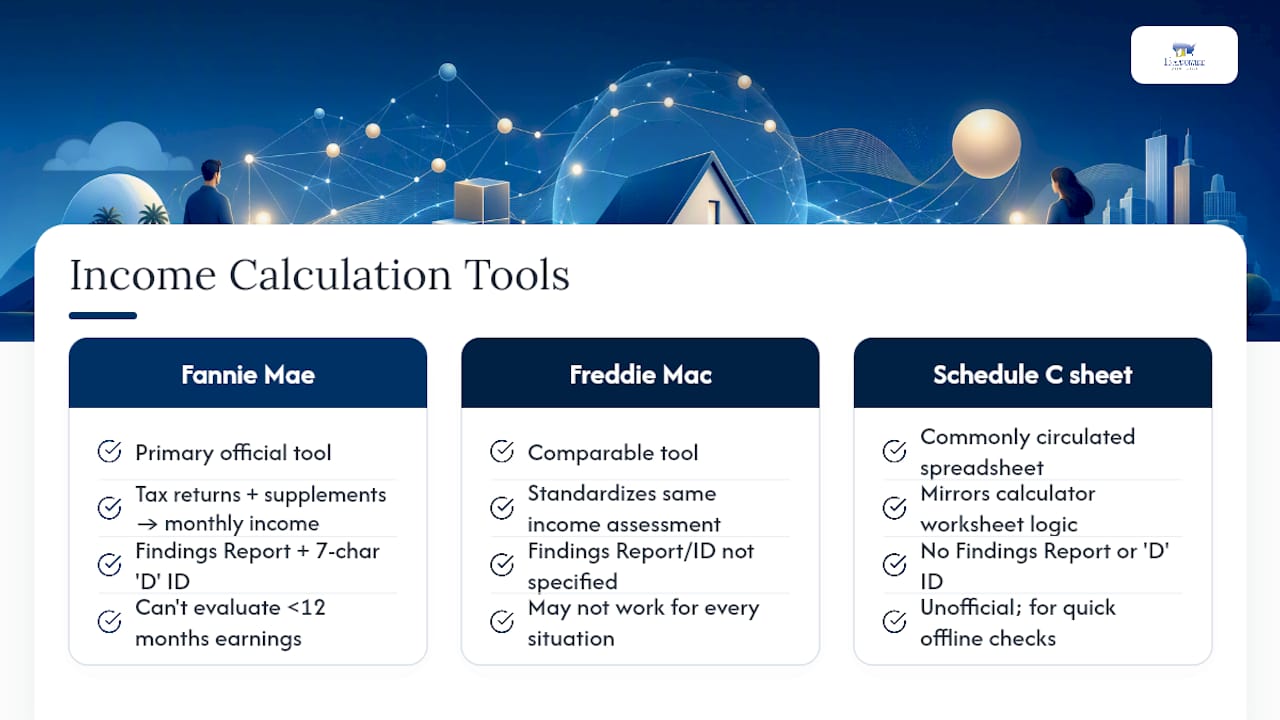
The Fannie Mae Income Calculator is the primary official tool for this job. Feed it your tax return data and supplemental inputs, and it returns a qualifying monthly income figure along with a downloadable Findings Report, plus a unique 7-character identifier starting with “D” that lenders can save for rep-and-warrant relief.
Freddie Mac runs a comparable Income Calculator that standardizes the same kind of income assessment. Neither tool works for every situation. Fannie Mae’s calculator can’t evaluate less than 12 months of earnings history or certain business-structure changes.
For a quick offline check, insurers and lenders commonly circulate Schedule C calculator spreadsheets that mirror the same worksheet logic.
A Worked Example: Two Years of Schedule C Into Monthly Income
Here’s how the math plays out for a self-employed consultant:
- Add each year’s net profit, add-backs, and subtractions to get the adjusted annual total.
- Sum both years: $64,700 + $65,200 = $129,900.
- Divide by 24 (two years, monthly average): $129,900 divided by the number of months in the period gives the monthly qualifying income.
If Year 2 had shown a decline instead of growth, the underwriter would more likely use Year 2 alone divided by 12, not the blended average. Keep the Fannie Mae tax return pages, your Income Calculator Findings Report, and your YTD P&L together. That’s the documentation trail underwriting will ask to see.
What “Stable and Continuous” Income Really Means to Underwriters
Underwriters aren’t just running math. They’re forming a judgment about whether your business is viable and likely to keep producing income at a similar or better level. Consistency and documentation matter as much as the number itself.
When Schedule C qualifying income comes up short, or your write-offs have pushed your reported income too low to qualify, other paths exist. 1st Nationwide Mortgage offers bank statement loans that qualify off deposits instead of tax returns, DSCR loans for investment properties that qualify off rental cash flow, and NONI programs for borrowers without documentable income.
- DSCR loans apply to investment or non-owner-occupied properties only, never a primary residence
- Program availability varies by state and specific loan product
Pro Tip: If your write-offs are aggressive enough to hurt your Schedule C number every year, a bank statement loan may qualify you off actual deposits instead of tax-adjusted income.
A Mortgage Banker’s View on Getting This Calculation Right
Getting the Schedule C calculation right the first time is the difference between a file that clears underwriting in weeks and one that bounces back for clarification three times. The borrowers who move fastest are the ones who show up with reconciled bank statements, a signed YTD P&L, and a saved Income Calculator Findings Report already in hand. That preparation doesn’t just speed approval. It often changes the loan amount you qualify for, because a well-documented add-back can add meaningfully more purchasing power than a bare tax return ever shows.
How 1st Nationwide Mortgage Helps Self-Employed Borrowers Qualify
If your Schedule C math still leaves you short of the loan amount you need, that’s not the end of the road. As a direct mortgage banker, not a broker, 1st Nationwide Mortgage built programs specifically for borrowers whose tax returns don’t tell the full income story. DSCR loans qualify investment properties on rental income alone, with no cap on the number of financed properties. NONI programs work for borrowers who can’t document income through conventional means at all.

None of these require rates or approval terms quoted in advance, and availability varies by state and product. What we can tell you now is which program fits your file. Run your numbers through the bank statement loan calculator or review the 12-month bank statement program to see where you land, then talk to a loan officer for a full file review.
For illustration only. Not a commitment to lend. Rates and terms subject to change and qualification. 1st Nationwide Mortgage Corporation, NMLS #1281. Equal Housing Lender.
Sources
- Income Calculator | Fannie Mae
- Income or Loss Reported on IRS Form 1040, Schedule C | Fannie Mae
- Freddie Mac Income Calculator
- Schedule C income calculator (XLSX) | Essent